
If you don’t understand what Binance is, [Click Here to Read Our Full Review].
You have opened your account, but your balance is $0. How do you move money from your Bank Account to Binance? The answer is: Binance P2P (Peer-to-Peer).
This is a marketplace where you trade directly with other users. Binance acts as the Escrow service (Middleman) to ensure safety.
Follow this Trade Bros 528 guide to deposit funds securely without fees.
I. Prerequisites Before Trading
- KYC Verified: Mandatory.
- Payment Method Added: Go to P2P -> Profile -> Add Bank Account.
- ⚠️ Golden Rule: The bank account name MUST MATCH your Binance KYC name. Third-party payments are strictly prohibited.
II. Step-by-Step Guide to Buying USDT
Step 1: Access P2P Trading
- Open the Binance App.
- Tap P2P Trading on the homepage.
- Select your local currency (e.g., VND, USD, EUR) in the top right corner.

Step 2: Select a Reputable Merchant (Filter)
Safety first! Do not just pick the cheapest price. Look for these indicators:
- Select BUY -> Select USDT.
- Check the Merchant’s stats:
- Orders: > 500 completed orders.
- Completion Rate: > 95% (The higher, the better).
- Yellow Badge: Verified Merchant (Highly trusted).
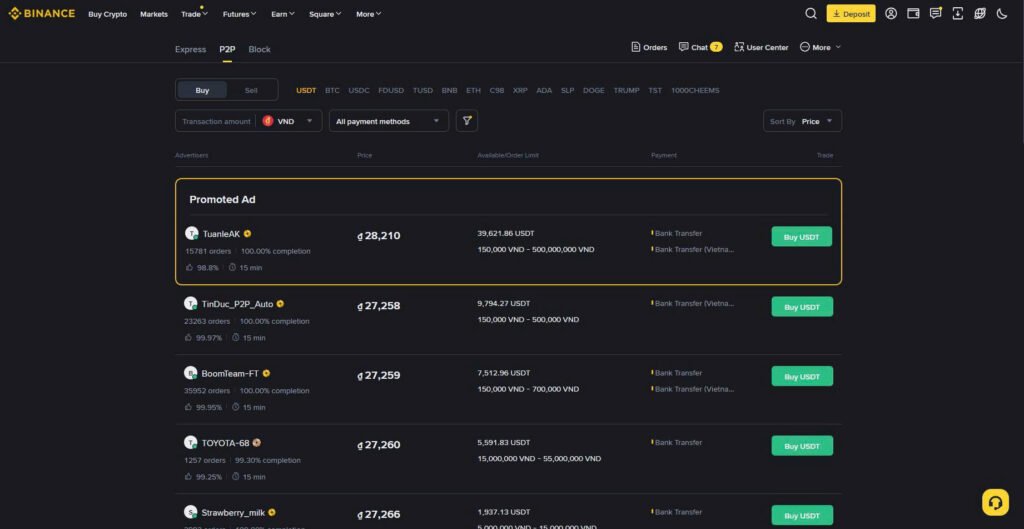
Step 3: Place Your Order
- Tap the green Buy button next to the merchant.
- Enter the amount of Fiat currency you want to spend (e.g., $100).
- Tap Buy USDT.

Step 4: Make the Payment (Crucial)
Binance will display the seller’s bank details. You have ~15 minutes to pay.
- Open your Banking App.
- Transfer the EXACT AMOUNT.
- Payment Remark (Memo): Only enter the Order ID provided by Binance.
- ❌ NEVER WRITE: Crypto, Bitcoin, USDT, Binance… (Banks may freeze your transaction).
- Save the payment screenshot.

Step 5: Confirm Payment
- Go back to Binance.
- Tap “Transferred, Notify Seller”.
- Warning: Only tap this button AFTER you have successfully sent the money.
Step 6: Receive Crypto
Once the seller confirms receipt, they will release the crypto.
- The USDT will arrive in your Funding Wallet.
- Done! You are ready to trade.
III. 3 Safety Rules to Avoid Scams
- Never Cancel After Payment: If the seller asks you to cancel the order after you paid (claiming a system error), REFUSE. Keep the order open and contact Support.
- Stay Inside the App: Keep all chat communications within Binance. Do not use Telegram or WhatsApp for P2P discussions.
- Use the Appeal Button: If the seller does not release the coin after the time limit, click Appeal and upload your proof of payment. Binance Customer Support will step in to release the funds to you.
╰┈➤ Don’t know what KYC is?
╰┈➤How to Register & Claim Your Exclusive Bonus.
Disclaimer
The content provided in the Trade Bros 528 Crypto Academy is for educational purposes only and does not constitute financial advice. Cryptocurrency trading involves a high level of risk. Always do your own research (DYOR).